Showing posts with label sync files online. Show all posts

Thursday, August 9, 2012

Google Drive - Get 5GB Online Storage Space for Free


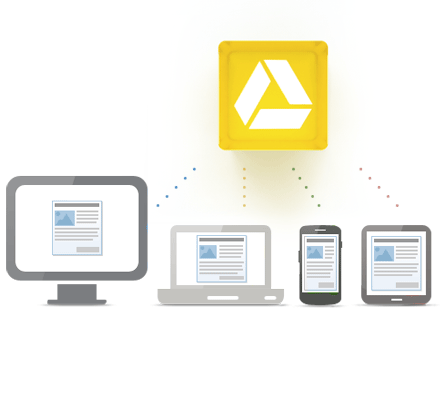
Google Drive is a cloud storage service from search engine god Google, using that you can store and sync your files online and access it anywhere in the world at any time. Google Drive is also the new home for Google Docs.  You can create docs, spreadsheets, presentation, and store it on cloud.  Google Drive is available for Windows XP, Windows Vista, Windows 7, Android Smartphones and tablets, iPhones and iPads, Mac OS X Lion and Snow Leopard, Chrome OS.  Just install Google Drive on your computer or mobile phone and start uploading your Google Docs, PDFs, photos, videos, etc. to the cloud service.  The uploaded stuffs are really safe and you can access it with your PC, Mobile Phone, tablet and access it anywhere on the web, in your home, at office, on the move.  You can easily search your files by keywords and filter by file type.  Moreover, you can open over 30 file types right on your browser, even your computer doesn't have the program installed on it.

Google Drive
Google Drive provides 5GB free space to store your files and if you want more than you just upgrade to their premium services like 25GB for $2.49/month, 100GB for $4.99/month and 1TB for $49.99/month.  There are some Google Apps are also available to enhance the utility of Google Drive like sending fax, editing photos and videos, create website mockups, etc. directly from Google Drive.  You can easily share your files to your friends, family, colleagues, etc.

Download Google Drive

Wednesday, February 29, 2012

4Sync - Sync & Backup Your Files Online for Free


4Sync is one of the most popular file syncing service that lets you to sync all your photos, documents, music, videos, zips, etc. between all your devices.  So that you no need to save your files or update files separately on each and every device you have.  You can upload, access and share your files from anywhere for free.  All you have to do is install 4Sync on your devices and you can access your files from anywhere, anytime with your Windows PC, Mac, iPhone, Android Phones, etc.  with an internet access.  After install it on your device it will ask to sign up with their cloud storage service.  You can sign up for free using your email id, that acts as username to login into your account.  4Sync provides you 10GB of free cloud storage space to store your data online.  If you want more online space to store your documents then you can go ahead with their premium plans. It's very much easy and secure to store files using 4Sync.  4Sync provides its users with backup copies of their files and ultimate secure work with their computers.  So that you no need to panic of system crash, virus attacks, etc.


Software Information

Name         :  4Sync

Developer   :  4Sync Inc.

License       :  Free

Platform     :  Windows, Mac, iOS, Android, Blackberry, Symbian

Download 4Sync for Free (Windows)

Download 4Sync Apps for iPhone

Download 4Sync Apps for Android

Download 4Sync Mobile Apps for Blackberry

Related Posts

Apple iCloud - Get 5GB Online Storage Space for Free

Backup Your Files Securely Online With Wuala

Friday, January 20, 2012

Apple iCloud - Get 5 GB Free Cloud Storage


iCloud is a cloud storage service from Apple Inc. that allows you to store music, photos, documents, bookmarks, iBooks, reminders, notes, phone and email contacts, etc wirelessly. iCloud automatically stores your content so that you can access it in your iPhone, iPad, iPod touch, Mac, or PC. iCloud keeps all your email, contacts and calendars up to date across all your devices. You no need to manage or sync your data between any iOs devices or your PC.


iCloud Features

iTunes in the Cloud

You can access all your purchased music and TV shows from any of your devices wirelessly without syncing.

Photostream

With Photo Stream, you can take a photo on one iOS device and it automatically appears on all your other devices, including your Mac or PC. Import new pictures to your computer from a digital camera, and iCloud sends copies over Wi-Fi to your iPhone, iPad, and iPod touch. You can even view recent photos on your big-screen TV via Apple TV. There’s no syncing, no email attachments, no file transfers.

Documents in the Cloud

You can create amazing documents and presentations on your iPhone, iPad, and iPod touch. And now with iCloud, you can keep your work up to date across all your iOS devices. You don’t have to save your work or transfer any files. Your documents — with all your latest edits — automatically appear everywhere.

Apps

You can have thousands of apps available on the Apple iTunes store. Once you download an app then it available on all your devices. If an app you bought previously isn’t on one of your devices, not to worry. You can download it again from your purchase history — at no additional charge.

iBooks

Buy a new book from the iBookstore, and iCloud makes sure it appears everywhere — your iPhone, iPad, and iPod touch.

Calendar, Mail, Contacts

iCloud stores all your email, calendars, contacts and keeps it up to date across all your devices.

Backup

iCloud backs up your purchased music, tv shows, apps, books, photos and videos in the camera roll, messages, ringtones, home screen, device settings, etc. without using a single cable (through wi-fi).

Find my Friends

Find your friends is an excellent tool using that you can keep track your whereabouts of your family at a crowded place.

More Features

Free Storage Space

Get 5GB of free storage when you sign up for iCloud.  That's more than enough for a regular user.  If you want more storage space, then you can easily purchase a storage upgrade right from your device.

Easy to Use

Setting up iCloud service from your device is so simple and it's also same for the usage.

Apple iCloud Cloud Storage

Tuesday, May 24, 2011

Backup, Sync, Share Your Files securely with Wuala

Are you really looking forward to backup your files online securely and access it to from anywhere at anytime.  Then Wuala is the better choice for you.  You can store your files safely and securely and share it easily using Wuala..

Security & Privacy

In order to protect your privacy, Wuala encrypts the data on your computer before it is uploaded. During the upload, your data is split up into many different pieces and stored in multiple places to make certain that you never lose a single file. For added security your password is never transmitted, which means that no one - not even the employees at Wuala - can see your private files.

Protect Your files with Automatic Backup and file versioning

Your digital life is safe when you are store your files at Wuala.  In case you need to access previous versions of files, or have accidentally deleted a file on your desktop, Wuala lets you restore it, saving you time and stress.

Sync
Sync your files - online and across multiple computers.

Keep your files in sync with just one click. If you're on the go and add a file to your Wuala Sync folder, the file will automatically appear on all of your computers, edits on your home computer will instantly appear on your work computer. Your files are always up to date, anywhere at anytime.

Store & Access
Store your files online and access them on the go.

Access your files from any computer with an Internet connection, wherever you are. Now, you can manage files with your own secure Wuala account at home and at work. Store documents, presentations, images, or media files - anything you want, no matter the file size or format. Wuala's intuitive interface also makes online slideshows easy, allowing you to select the size of your photos for family and friends.

Share
Instant sharing with contacts and co-workers.

Instead of emailing files, share documents, photos, and media directly from your Wuala account. Using our simple filing system, share folders with fellow members of Wuala or send links to your contacts that have yet to join. Links can be accessed immediately - with no registration required.

Collaborate
With Wuala’s Groups, working with others has never been easier.

Business Groups are great for businesses, associations, communities or teams who want to store their files in one central and secure location. Private and Public Groups count the used storage for uploaded files to an individual account, while Business Groups allow you and your team to share an amount of storage together. Simply share data with colleagues and co-workers in one Business Group, edit documents or leave a comment. Get ready to collaborate in a new way.

Remote Access

You can run Wuala directly from the web. No download or installation required. Just click START to access your files wherever you go - at the university, from an Internet café or at work.

Java required

In order to launch the full-featured Wuala desktop application directly from the web, Java is required. Java is installed on most computers so this shouldn't be a problem. In case it is not installed on this computer, you can still access folders that have been shared by web link (click on the web link that you've received in an email or enter the URL in the address-bar of your browser).

Wuala provides 1 GB storage space for free.  If you want more storage space then you can buy extra storage space from Wuala.

Download  :  Windows | Mac | Linux
Bookmark & Share

Enter your email address:

Delivered by FeedBurner

Search This Blog